Quick answer
An AirTag battery change takes about two minutes: press down on the steel cover, turn it counterclockwise, swap in a fresh CR2032 coin battery with the positive side up, and turn the cover back until you hear the chime. Apple says the battery lasts more than a year with typical use, and Find My tells you when it's low. The real trick for a wallet AirTag is the long game: a quick seasonal check so the tag never quietly dies in your pocket.

When you first put an AirTag in your wallet, everything feels exciting. You test Play Sound, you watch the little icon move in Find My, you turn on the left-behind alerts. Then the novelty fades, months go by, and the AirTag becomes invisible, which is exactly what it should be. The only catch: an invisible tracker is easy to forget, and a tracker with a dead battery is just a plastic disc.
That's why “airtag battery change” is one of the most searched AirTag questions in the US. This guide covers the change itself, the signs it's due, and a simple 12-month plan to keep a wallet AirTag reliable after the first excitement is long gone.
What happens to a wallet AirTag after the first few months
Most of the time, nothing dramatic. The AirTag keeps working in the background, and the only thing slowly changing is the coin battery. A few everyday things affect how fast it drains:
- Play Sound and Precision Finding. Every time you ring the wallet or use the on-screen arrow to find it, the AirTag works harder. Frequent “where's my wallet?” moments mean a shorter battery life.
- Sharing. If a partner or family member also locates the AirTag, it gets used more often.
- The battery you install. Not every CR2032 makes good contact inside an AirTag (more on that below).
The wallet itself ages more slowly than you might think. A carbon fiber shell like the one on the SafeTrack Wallet doesn't stretch like leather, so the AirTag holder and the card section keep their shape. What changes over a year is usually what you carry inside it, and that's worth a check too.
How to know an AirTag battery change is due
You don't need to guess. Apple builds the warnings in:
- A notification on your iPhone when the AirTag battery is low.
- “Low Battery” under the AirTag's name in Find My (open Find My → Items → select the AirTag).
- Weaker or no sound when you use Play Sound, or location updates that seem slower than usual. If updates stop for other reasons, our guide to an AirTag in your wallet not updating in Find My walks through every cause.
How to change the AirTag battery, step by step
These are the official steps from Apple Support, adapted for a wallet AirTag:
- Take the AirTag out of the wallet holder. With an outside holder like SafeTrack's, your cards and cash stay put.
- Press down on the polished stainless steel cover and turn it counterclockwise until it stops.
- Remove the cover and the old battery.
- Insert a new CR2032 lithium 3V coin battery with the positive (+) side facing up.
- Line up the three tabs on the cover with the three slots on the AirTag, then turn the cover clockwise until it stops. You'll hear a sound when the battery connects.
- Put the AirTag back in the wallet holder and open Find My to confirm the wallet shows up and the Low Battery note is gone.
About bitter-coated batteries: Apple suggests a bitterant-coated CR2032 to discourage accidental swallowing, but also warns that some of these batteries may not work with AirTag. The simple fix is to buy a pack that says “Compatible with Apple AirTag” on the label. If you don't hear the chime, try another brand rather than scraping anything off. And keep spare coin batteries well out of reach of small children.
Your 12-month plan for a wallet that stays tracked
The goal isn't more effort, it's four short check-ins a year, tied to moments you already notice. Here is the plan we use:
| Season | 2-minute check | Why it matters |
|---|---|---|
| Winter (Dec–Feb) | Check battery status in Find My; confirm Notify When Left Behind is on | Coats, holiday travel and busy stores mean more chances to leave the wallet behind |
| Spring (Mar–May) | Clear out receipts and expired cards; wipe the wallet | A slim wallet is easier to notice in your pocket and fits the holder cleanly |
| Summer (Jun–Aug) | Test Play Sound before vacation; check sharing settings | Beaches, rentals and airports are where wallets go missing |
| Fall (Sep–Nov) | Battery check again; buy a spare AirTag-compatible CR2032 | Having a spare at home turns a warning into a two-minute fix |
Two extra moments deserve a quick look whenever they happen: after a major iOS update (make sure Find My, Bluetooth and notifications are still on) and after you switch iPhones (confirm the AirTag still shows under your Apple ID on the new phone).
When to reassess the whole setup
Once a year, ask three questions: Am I still carrying only what I need? Does the AirTag still sit securely in the holder? Do my left-behind alerts fire where they should (restaurant, gym, car)? If your wallet has become a brick again, our checklist of what to keep in your wallet helps you slim it back down. For the shell itself, a gentle wipe as described in how to clean a carbon fiber wallet is all it needs.
Small habits that make a wallet AirTag last
- Use the map first, the sound second. Check Find My for the last location before ringing the wallet over and over.
- Keep a spare battery in one place, the same drawer every time, with a note of the date you last changed it.
- Give the wallet one landing spot at home so you rarely need Precision Finding just to find it in the house.
- Write the change date in your phone's calendar and set a reminder for 11 months later to check the battery status.
Our recommendation: the SafeTrack Wallet
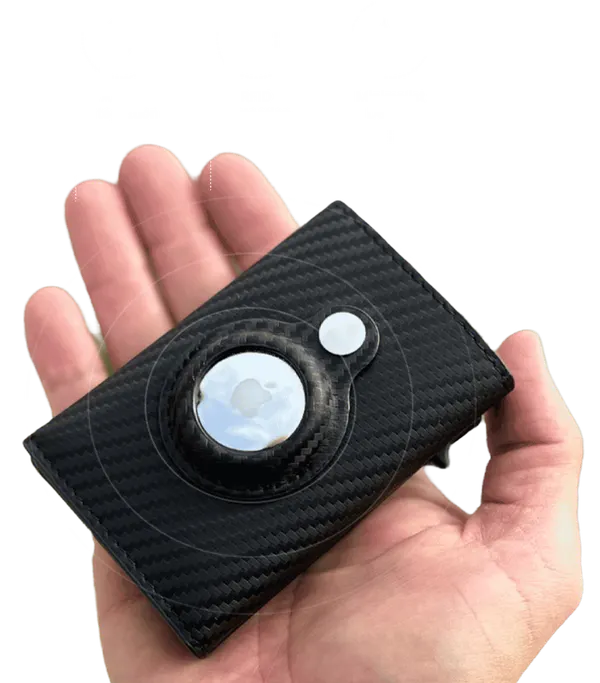
A long-term AirTag routine works best when the wallet makes it easy, and that's exactly what the SafeTrack Wallet was designed for. The AirTag lives in a built-in holder on the outside of the wallet, so a battery change means popping the tag out, swapping the coin cell and clicking it back in, without unloading a single card. It's the wallet we recommend for anyone who wants their wallet findable not just this month, but all year.
- Built-in AirTag holder on the outside, so the tag sits flush and comes out in seconds for a battery change (AirTag sold separately).
- RFID-blocking carbon fiber body that keeps contactless cards shielded and holds its shape month after month.
- Pop-up card access and room for 1–14 cards plus up to 20 folded bills.
- Slim, light profile (about 1.7 oz) that rides comfortably in a front pocket.
- From $44.95 on the official site, $35 per wallet in the 3-pack with free shipping from three wallets, and a 90-day guarantee.
Read our full SafeTrack Wallet review or compare every bundle on the home page.
Frequently asked questions
How often do you need an AirTag battery change?
Apple says the AirTag's replaceable CR2032 battery lasts more than a year with typical use. Heavy use of Play Sound and Precision Finding drains it faster. The easiest rule is to change it when Find My shows Low Battery, and to glance at the battery status once a season.
What battery does an AirTag take?
A CR2032 lithium 3V coin battery. Apple suggests a bitterant-coated CR2032 to discourage accidental swallowing, but notes that some bitterant-coated batteries may not work with AirTag, so look for packaging that says it is compatible with Apple AirTag.
Do I have to take the AirTag out of my wallet to change the battery?
Yes, you need the AirTag in your hand to twist off the cover. With a wallet like the SafeTrack Wallet, the AirTag sits in an outside holder, so it comes out and goes back in within a minute without unloading your cards or cash.
Will my AirTag stay paired after the battery change?
Normally yes. The AirTag stays linked to your Apple ID, and you hear a sound when the new battery connects. Open Find My afterwards to confirm the wallet shows up and the Low Battery note is gone.
How do I check the AirTag battery level?
Open the Find My app on your iPhone, tap Items and select the AirTag. If the charge is low, Low Battery appears under its name, and your iPhone also sends a notification when the battery is running down.
Is the AirTag included with the SafeTrack Wallet?
No. The SafeTrack Wallet includes the built-in AirTag holder, and the AirTag is sold separately. Many people move the AirTag they already own into the wallet.
Source for the replacement steps and battery warnings: Apple Support, “How to replace the battery in your AirTag.” AirTag, Find My and iPhone are trademarks of Apple Inc.; Tracker Pulse is not affiliated with Apple.