The short answer
An AirTag fits in a wallet, but it won't sit flat on its own. It's a round disc about a third of an inch thick, so dropped loose into a slim wallet it bulges and tends to slide out of the bill pocket. You have five ways to carry it: loose, in a sleeve or insert, on a money clip, on a cash strap, or in a wallet with a built-in AirTag slot. The built-in slot is the most secure and the slimmest. Whatever you choose, turn on Notify When Left Behind in Find My — that one setting is what turns an AirTag from “nice to have” into “never lost it again.”
The wallet is the thing most of us panic about first. It holds the cards, the ID, the cash, the insurance card you only remember when you need it. So it makes sense that “AirTag in wallet” is one of the most common reasons people buy an AirTag in the first place. The catch is that Apple designed the AirTag as a round disc — perfect for a keyring or a backpack, less perfect for something you sit on all day.
Here's how to make it work, what each option is really like day to day, and the quick setup most people skip.
Does an AirTag actually fit in a wallet?
It fits — it just doesn't disappear. An AirTag measures roughly 1.26 inches across and about 0.31 inch thick. A credit card is a tiny fraction of that thickness, so a single AirTag can be as thick as a whole stack of cards. In a roomy bifold you'll barely notice it. In a slim card holder or a minimalist wallet, you'll feel a hard bump in your pocket, and if the tag is loose in the cash section it will eventually slip out — usually right when you open the wallet to pay.
That's the real problem to solve: holding the AirTag securely and flat enough that you forget it's there. Not sure a dedicated tracker wallet is for you? Take our 2-minute smart wallet self-test.
The 5 ways to carry an AirTag in your wallet
| Option | Bulk | Security | Best for |
|---|---|---|---|
| 1. Loose in the bill pocket | Noticeable bump | Low — can slip out | Trying it out for a day |
| 2. Sleeve or card-shaped insert | Moderate | Good | Roomy leather bifolds |
| 3. AirTag money clip | Moderate | Good | Minimalist card holders |
| 4. Cash strap with tag holder | Moderate | Fair | Strap-style wallets |
| 5. Wallet with a built-in AirTag slot | Lowest — designed in | Highest | Anyone replacing an old wallet |
1. Loose in the bill pocket
Free and instant. It's a fine way to test whether you like tracking your wallet, but it's the option most likely to fail: the tag shifts around, adds a lump, and can fall out when you pull out bills. If you go this route, put it in the deepest, tightest compartment you have.
2. Sleeve or card-shaped insert
A thin holder, about the size of a credit card, with a round cut-out that grips the AirTag. It slides into a card slot and keeps the tag in one place. It works well in bigger leather wallets; in slim ones, the combined thickness can stretch the slot.
3. AirTag money clip
A clip with a small housing for the tag, attached to the outside of a card holder. Secure, and it doubles as a cash clip, but it adds a visible bump on the outside of the wallet.
4. Cash strap with a tag holder
An elastic or leather strap with a round pocket for the AirTag in the middle. Good for strap-style wallets and keeps a minimalist look, though it's a little easier to snag on a pocket.
5. A wallet with a built-in AirTag slot
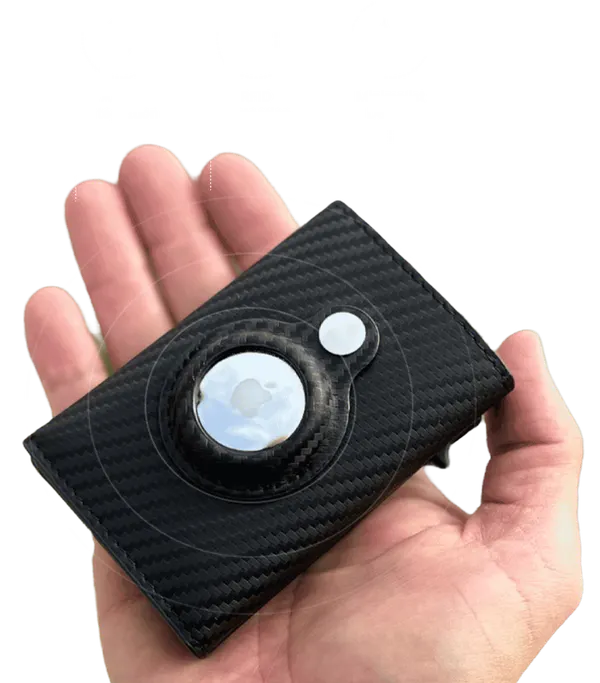
Instead of adding an accessory to an old wallet, the wallet is designed around the tag. The AirTag clicks into a dedicated pocket that sits flush with the shell, so it can't slide out and doesn't make the wallet lopsided. If you're due for a new wallet anyway, this is the cleanest solution — and you get to slim down everything else you carry at the same time.
The 2-minute setup that makes it actually useful
Where you put the AirTag matters less than how you set it up. Most people pair it and stop there — and miss the feature that prevents losses in the first place.
- Pair it with your iPhonePull the battery tab, hold the AirTag near your unlocked iPhone and follow the prompt. Pick “Wallet” as the name so it's easy to spot in Find My.
- Turn on Notify When Left BehindOpen Find My, go to Items, tap your wallet and switch on Notify When Left Behind. Add home as a trusted location so you aren't pinged every time you leave it on the dresser.
- Try Play Sound onceHide the wallet under a couch cushion and play the sound from your phone. Knowing what it sounds like makes the real search faster.
- Check Precision FindingOn supported iPhones, Find My can point you toward the AirTag with on-screen arrows when it's nearby — handy in a car or a crowded room.
- Mind the batteryAirTags use a standard replaceable coin cell, and Apple says the battery lasts more than a year. Your iPhone will tell you when it's running low.
Why the wallet is the item most worth tagging
Your phone can find itself through Find My, as we explain in our guide on how to find a lost or stolen phone. Your wallet can't. It has no battery, no GPS and no way to call for help — and losing it means canceled cards, a trip to replace your ID and a lot of phone calls. Most wallets aren't stolen, either; they're left behind in transitions: the café table, the rideshare seat, the gym locker. We dig into why in why your brain keeps losing keys, wallets and phones.
That's exactly the moment a left-behind alert catches. Your phone buzzes while you're still close enough to turn around, instead of an hour later when you reach for your card.
Where the SafeTrack Wallet fits in
The SafeTrack Wallet is a good example of option 5. It's a slim carbon fiber wallet with a built-in Apple AirTag slot, RFID blocking for contactless cards and a slide lever that fans your cards out with one push. According to the maker, it measures 3.86 x 2.56 x 0.83 inches, weighs about 1.7 oz and holds 1 to 14 cards plus up to 20 bills — so the AirTag gets a secure home while the rest of your carry gets slimmer.
Two honest notes: the AirTag is sold separately (many iPhone owners already have one), and it's available only through the official website. Every order comes with a 90-day money-back guarantee, which is plenty of time to carry it daily and test the left-behind alerts for yourself.
Frequently asked questions
Does an AirTag fit in a wallet?
Yes, but not flat. An AirTag is a round disc roughly 1.26 inches across and about a third of an inch thick, so in a slim bifold or card holder it creates a visible bump and can slide out of the bill compartment. That's why people use sleeves, money clips, cash straps or wallets with a dedicated AirTag slot.
Where is the best place to put an AirTag in a wallet?
Somewhere it's held securely and can't fall out when you pull out cash or cards. A purpose-built slot is the most secure option; a snug insert or sleeve is the next best. Avoid leaving it loose in the bill section, where it tends to slip out exactly when you open the wallet.
Will an AirTag damage my credit cards?
There's no widely reported issue with AirTags harming modern chip or contactless cards. The practical concern is physical: a hard disc pressed against cards in a tight wallet adds bulk and pressure, which is another reason a dedicated slot is more comfortable.
Does an RFID-blocking wallet stop the AirTag from working?
A wallet designed for an AirTag places the tag so it can still communicate with your iPhone and the Find My network. If you put an AirTag inside a fully enclosed metal card case, the signal can be weakened, so it's better to use a wallet that was built with an AirTag slot in mind.
How do I get alerts if I leave my wallet behind?
In the Find My app on your iPhone, open the Items tab, select the AirTag in your wallet and turn on Notify When Left Behind. Your iPhone will then alert you when you walk away from it, with the option to exclude trusted places like home.
Do I need a subscription to track my wallet with an AirTag?
No. AirTags use Apple's Find My network, which has no monthly fee. You only need an iPhone with Find My turned on. The AirTag itself is bought separately from Apple.
Traveling soon? Read our 9 ways to keep your wallet, passport and luggage safe when you travel, or head back to the home page to see how SafeTrack works.