Quick answer
Most smart-wallet listings boil down to a handful of terms: RFID and NFC (how contactless cards talk), RFID blocking (the shielding that keeps them quiet), the material (carbon fiber, aluminum, leather), the format (bifold, card holder, pop-up) and tracking (an AirTag slot that works with Apple’s Find My). Once you know these 12 words, you can read any product page in thirty seconds and tell whether a wallet really fits how you carry things.
Shopping for a new wallet used to mean choosing a color. Today the product pages read like spec sheets: RFID, NFC, carbon weave, pop-up mechanism, cash strap, AirTag compatible. Some of these terms matter a lot in daily life; others are mostly marketing. This glossary explains the 12 wallet terms you will actually run into, in plain English, with what each one means for your pocket.
1. RFID (radio-frequency identification)
A way for a small chip to share data over radio waves when a reader powers it up from close range. Building badges, transit passes and some ID cards use RFID. What it means for you: several cards in your wallet may be wireless, even if you never think about it.
2. NFC (near-field communication)
A short-range type of RFID used by contactless payment cards and phones. It only works over a few centimeters, which is why you hold your card right up to the terminal. What it means for you: the “tap to pay” symbol on your credit card means it has an NFC chip.
3. Skimming
Any attempt to read card data without permission. Classic skimming happens at tampered card readers, ATMs and gas pumps. Wireless skimming means trying to read a contactless card through a pocket with a hidden reader. What it means for you: modern contactless payments use one-time codes, so the bigger everyday risk is still a lost or stolen wallet. We break down the real picture in do RFID-blocking wallets actually work?
4. RFID blocking
A layer of metal or conductive material that stops radio signals from reaching the cards inside, the same principle as a Faraday cage. What it means for you: while the wallet is closed, your contactless cards and badges stay silent; you take the card out to pay.
5. Carbon fiber
A material made from very thin carbon strands woven together and set in resin. It is known for being strong, rigid and light, with a distinctive woven look. What it means for you: a carbon fiber wallet keeps its shape, does not stretch like leather and stays slim for years. Compare it with traditional materials in carbon fiber vs leather wallets.
6. Minimalist wallet
A wallet designed to carry only what you use: a few cards, some cash, an ID. The idea is less bulk, faster access and a front-pocket fit. What it means for you: if your wallet is thicker than your phone, a minimalist design usually halves it. Not sure what to keep? See what to keep in your wallet.
7. Bifold, trifold and card holder
A bifold folds once, a trifold folds twice, and a card holder is a flat sleeve with no fold at all. What it means for you: every fold adds thickness. Rigid card holders and cases sit in between: slimmer than a bifold, with more structure than a sleeve.
8. Pop-up (card ejector)
A lever or slider that pushes your cards out in a staggered fan, so you can grab the one you need without digging. What it means for you: faster checkout and fewer cards dropped on the floor — especially handy one-handed.
9. Money clip and cash strap
A money clip is a spring-metal clip for folded bills; a cash strap or expandable back section is an elastic band or pocket that holds notes against the outside of a card case. What it means for you: if you still carry cash, check that the wallet has one of these and how many bills it is rated for.
10. Card capacity
The number of cards a wallet is designed to hold comfortably, usually given as a range. What it means for you: count your cards before buying. Overstuffing a rigid wallet makes the pop-up stiff; underfilling a leather one makes cards slide out.
11. AirTag slot
A built-in compartment shaped for an Apple AirTag, so the tracker sits flush inside the wallet instead of making a bump. Usually the AirTag itself is sold separately. What it means for you: once you drop one in, your wallet becomes findable on your iPhone. If you are weighing the options, read how to put an AirTag in your wallet.
12. Find My and Precision Finding
Find My is Apple’s app and network: an AirTag’s location is reported anonymously and with encryption by nearby Apple devices, so you can see where your wallet was last seen, play a sound and get notified if you leave it behind. Precision Finding uses Ultra-Wideband on compatible iPhones to point you to the item with an on-screen arrow. What it means for you: a wallet with an AirTag can go from “lost” to “on the café chair” in seconds.
All 12 terms at a glance
| Term | In one line | Why it matters |
|---|---|---|
| RFID | Chip read by radio at close range | Badges, passes, some IDs |
| NFC | Very short-range RFID | Tap-to-pay cards |
| Skimming | Reading card data without permission | Know the real risks |
| RFID blocking | Shielding layer | Cards stay silent while closed |
| Carbon fiber | Woven carbon in resin | Rigid, light, keeps its shape |
| Minimalist | Only the essentials | Less bulk, front-pocket fit |
| Bifold / card holder | Folds vs flat | Every fold adds thickness |
| Pop-up | Lever fans cards out | Faster access |
| Cash strap | Elastic or pocket for bills | Carry cash without a fold |
| Card capacity | How many cards fit well | Match it to your real count |
| AirTag slot | Built-in tracker pocket | Findable wallet, no bump |
| Find My | Apple’s finding network | Location, sound, left-behind alerts |
Which terms matter most when you choose
For most people, four boxes decide it: slim and rigid (so it fits the front pocket and keeps its shape), RFID blocking (peace of mind for contactless cards), quick card access (a pop-up you will actually enjoy using) and a way to find it (an AirTag slot). That combination is exactly what we looked for in our SafeTrack Wallet review.
Our recommendation: the SafeTrack Wallet
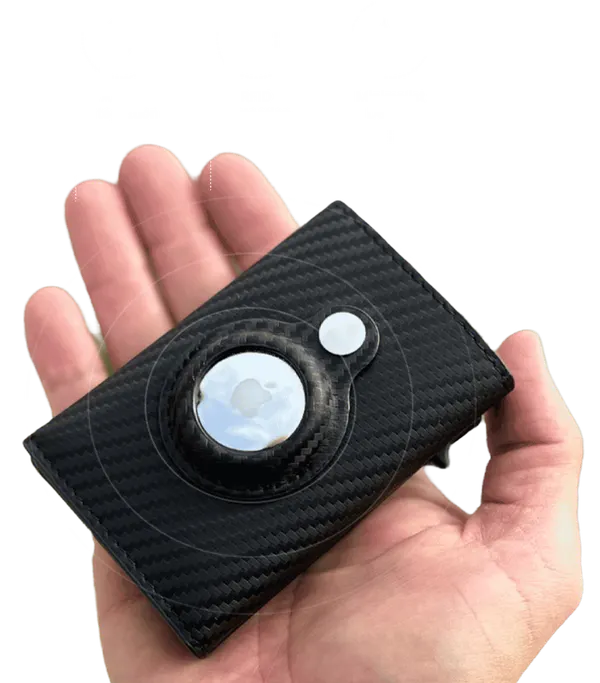
Now that you speak the language, the choice is simple: the SafeTrack Wallet is the wallet we recommend. It checks every box on this list in one slim carbon fiber shell:
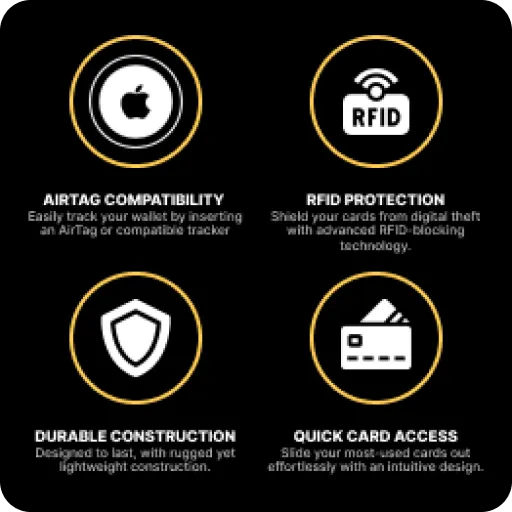
- Built-in AirTag slot: drop in an Apple AirTag (sold separately) and your wallet appears in Find My with its location, a sound you can play and left-behind alerts.
- RFID blocking: contactless cards and IDs are shielded while the wallet is closed.
- One-push card access: the slide lever fans your cards out so the one you need is right there.
- Slim and rigid: 3.86 x 2.56 x 0.83 inches and about 1.7 oz in carbon fiber, front-pocket friendly.
- Right-sized capacity: 1 to 14 cards or IDs plus up to 20 bills in the expandable back section.
Pricing rewards bundles: 1 wallet is $44.95 (plus $4.95 shipping), 2 wallets are $79.90, 3 wallets are $105 ($35 each, free shipping, the most popular choice), 4 wallets are $140 ($35 each, free shipping) and 5 wallets are $165 — $33 each with free shipping. Every order is covered by a 90-day money-back guarantee.
Frequently asked questions
What is the difference between RFID and NFC?
NFC is a very short-range type of RFID. Contactless payment cards and phones use NFC, which only works over a few centimeters; other RFID uses include building badges and transit passes.
Does an RFID-blocking wallet stop me from paying with my card?
Only while the card is inside the closed wallet. To pay, take the card out (or fan it out with a pop-up) and tap it on the terminal as usual.
Is a carbon fiber wallet better than leather?
It depends on what you value. Carbon fiber is rigid, light and keeps its slim shape for years; leather is soft and classic but tends to stretch and get thicker over time.
Does the SafeTrack Wallet come with an AirTag?
No. The SafeTrack Wallet has a built-in AirTag slot, and the AirTag is sold separately. Once inserted, it works with Apple’s Find My on iPhone for location, sound and left-behind alerts.
How many cards does the SafeTrack Wallet hold?
The maker rates it for 1 to 14 cards or IDs plus up to 20 bills in the expandable back section.
Want the full picture first? Read our SafeTrack Wallet review, see how it works on the homepage, or check the 9 signs you need a new wallet.