Quick answer
Yes. A carbon fiber, RFID-blocking wallet with an AirTag inside can go through airport security like any other wallet: it rides through the X-ray in a bin or your carry-on, and the AirTag’s small coin-cell battery is the kind of battery that is routinely allowed in personal devices. The only real wrinkle is the walk-through metal detector: RFID shielding, springs and rivets can contain some metal, so the smooth move is to take the wallet out of your pocket before you step through. And the biggest risk at the checkpoint is not the scanner at all – it is walking away and leaving the wallet in the bin, which is exactly where a left-behind alert earns its keep.
“Will my RFID wallet set off the metal detector?” and “Can I fly with an AirTag in my wallet?” are two of the questions we see most often from people who just upgraded to a smart wallet. They are fair questions: the wallet blocks radio signals, the tracker has a battery, and nobody wants to be the person holding up the line. Below we walk through what actually happens at a U.S. checkpoint, step by step, with the honest cautions – and the one habit that matters more than any of them.
Is an RFID-blocking wallet allowed through TSA screening?
Yes. A wallet is an ordinary personal item, and RFID blocking is not a restricted feature. The shielding layer simply stops contactless cards from answering a reader while the wallet is closed – it does nothing to the X-ray machine and the X-ray does nothing to it. If you want the background on how that shielding works, we explained it in do RFID-blocking wallets actually work?
What the X-ray operator sees is a dense rectangle with cards inside. Wallets with a pop-up mechanism or a tracker slot may show a few more shapes, but that is normal and familiar to screeners. As with anything at the checkpoint, the officer has the final word: if they want to look inside, open it for them.
Will it set off the metal detector?
This is where honesty matters more than marketing. Carbon fiber itself is not metal. But many RFID-blocking and pop-up wallets include small metal parts – the shielding layer, a spring or lever, rivets – and an AirTag has a metal battery and components. Whether that is enough to trigger a walk-through detector depends on the machine and its settings. You do not need to guess: take the wallet out of your pocket and put it in your carry-on before you step through, together with your phone and keys. That is what most screening lanes ask anyway, and it avoids a second pass or a pat-down.
Is the AirTag (and its battery) allowed on the plane?
Yes. An AirTag runs on a small CR2032 coin cell, the same type of battery found in car key fobs and watches. Small batteries installed in personal devices are routinely allowed in carry-on bags, and many travelers also put trackers in checked luggage to watch their bags at the carousel. Rules can change and airlines can add their own, so if you want the official word, check TSA’s “What Can I Bring?” tool and your airline’s battery page before you fly. For more on keeping valuables safe on the road, see our guide to protecting your wallet, passport and luggage while traveling.
Step by step: the smooth way through the checkpoint
| Moment | What to do with your smart wallet |
|---|---|
| In line | Have your ID ready, then zip the wallet into a closed pocket of your carry-on, not loose in a jacket. |
| At the bins | Wallet goes inside your bag or the jacket you place in the bin – never loose on its own, where it is easy to miss. |
| Metal detector / body scanner | Pockets empty. Nothing to explain, nothing to beep. |
| If the officer asks | Open the wallet and show the cards and the AirTag slot. It takes ten seconds. |
| After screening | Before you walk off, pat the bag pocket. Your phone’s left-behind alert is the backup if you forget. |
The real risk at security: the bin, not the scanner
Checkpoints are one of the classic places where wallets, phones and laptops get left behind. You are juggling shoes, a belt, a laptop and a boarding pass, someone behind you is in a hurry, and the wallet sits under a jacket in a gray bin. By the time you reach the gate, it is three hundred feet and a crowd away.
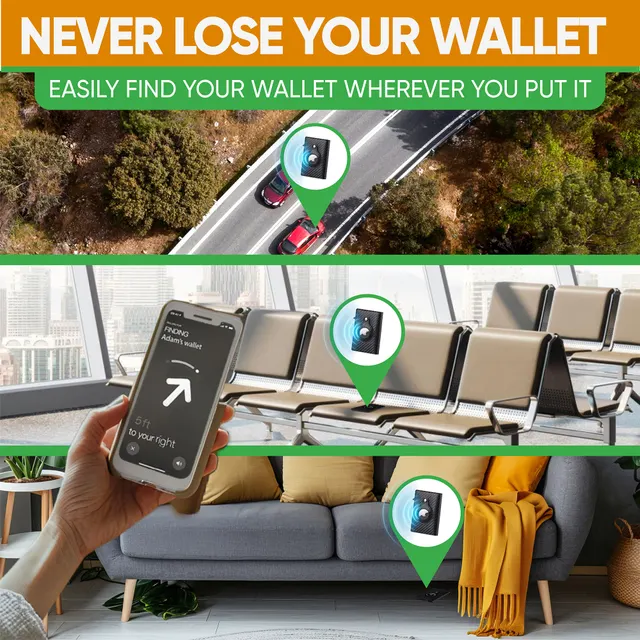
That is where a tracker inside the wallet pays off. With an AirTag in a wallet like the SafeTrack Wallet, your iPhone can warn you when you walk away from it, play a sound so you can find it in the bin pile, and show its last location in Find My if you only notice later. A Bluetooth tracker works best exactly in busy places like airports, where lots of compatible phones pass by – we explained why in Bluetooth finder vs GPS tracker.
A few honest cautions
- Officers decide. Screening procedures vary by airport and change over time. If an officer asks you to do something differently, do it.
- RFID blocking only works while the wallet is closed. Contactless cards still tap normally once you take them out at the shop or the gate.
- The AirTag is not included with most smart wallets. It is a separate Apple accessory that works with an iPhone and Find My.
- Unknown-tracker alerts are normal. If you travel with a companion’s tracked bag, their phone or yours may show a notice. That is a privacy feature, not a problem.
- International flights: security rules abroad are similar for wallets, but if you are unsure, check the airport’s own security page.
What people usually try instead
- Leaving the wallet in a back pocket and hoping. Sometimes it beeps, sometimes it does not – and back pockets are a pickpocket favorite in crowded terminals.
- A loose wallet in its own bin. Fast, but it is the easiest thing to overlook on the far side of the belt.
- A round AirTag on a keyring. Tracks your keys, not your cards and ID.
- “I’ll just be careful.” Until the 6 a.m. flight with a connection to catch.
Our recommendation: the SafeTrack Wallet
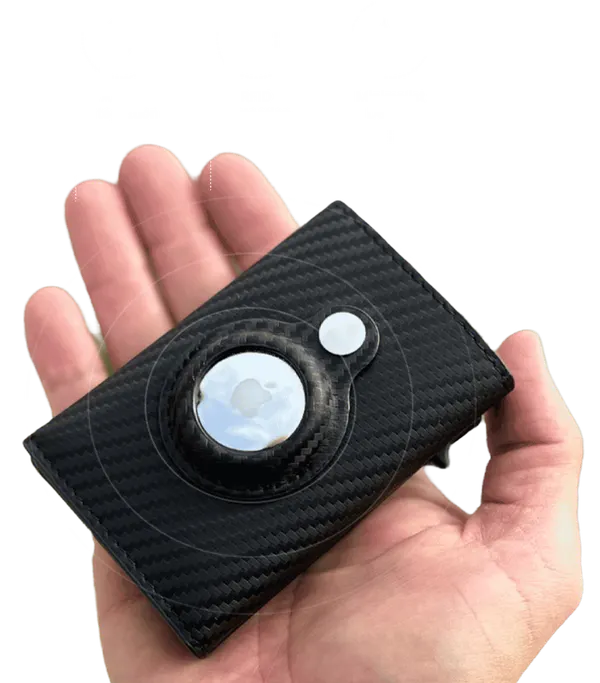
If you fly even a few times a year, the SafeTrack Wallet is the wallet we recommend for getting through security calmly and never leaving it behind. It was built for exactly this mix of slim, protected and trackable:
- Built-in AirTag slot: drop in an Apple AirTag (sold separately) and your wallet appears in Find My with its location, a sound you can play and left-behind alerts – ideal at the bins.
- RFID blocking: contactless cards and IDs are shielded while the wallet is closed, in crowded terminals and on the train to the airport.
- One-push card access: the slide lever fans out your cards so your ID is in your hand in a second when the officer asks for it.
- Slim and rigid: 3.86 x 2.56 x 0.83 inches and about 1.7 oz in carbon fiber, easy to slip into a carry-on pocket or a front pocket.
- Right-sized capacity: 1 to 14 cards or IDs plus up to 20 bills in the expandable back section.
Pricing rewards bundles: 1 wallet is $44.95 (plus $4.95 shipping), 2 wallets are $79.90, 3 wallets are $105 ($35 each, free shipping, the most popular choice), 4 wallets are $140 ($35 each, free shipping) and 5 wallets are $165 — $33 each with free shipping. A wallet for each traveler in the family is the classic pick. Every order is covered by a 90-day money-back guarantee.
Frequently asked questions
Can I wear an RFID-blocking wallet through the metal detector?
It may or may not beep, depending on the metal parts in the wallet and the detector settings. The smooth option is to put the wallet in your carry-on before you step through, together with your phone and keys.
Does an RFID-blocking wallet interfere with the airport X-ray?
No. The shielding only stops contactless cards from answering a reader while the wallet is closed. The X-ray shows the wallet like any other personal item, and the officer can ask you to open it.
Can I fly with an AirTag in my wallet?
Yes. An AirTag uses a small CR2032 coin cell, the kind of battery routinely allowed in personal devices. For the latest rules, check TSA’s “What Can I Bring?” tool and your airline’s battery policy.
Can I put an AirTag in checked luggage?
Many travelers do, to see whether their bag made the flight. Small coin-cell trackers are widely carried in checked bags; if in doubt, check your airline’s current battery rules.
Does the SafeTrack Wallet come with an AirTag?
No. The SafeTrack Wallet has a built-in AirTag slot, and the AirTag is sold separately. Once inserted, it works with Apple’s Find My on iPhone for location, sound and left-behind alerts.
What should I do if I left my wallet at airport security?
Go back to the checkpoint right away and ask the officers; items left in bins are usually held by the checkpoint or the airport lost and found. If an AirTag is inside, Find My shows its last location and lets you play a sound.
Want the full picture first? Read our SafeTrack Wallet review, see how it works on the homepage, or learn how to put an AirTag in your wallet without the bulge.